why
so everybody's doing this "wrapped" thing where they'd show you all the metrics for everything you did on that app for the entire day. i love data, so why not make it for myself.
how
i'm going to assume you actually know programming in python, cuz if not, you'll probably only going to get frustrated with my writeup.
background
i run VRCX all day every day, especially for when im actually using vrchat. if you dont use this, then you're out of luck. why not start using it so you have some data for next year? :3
code
by standard i like to have a config file for stuff that will change. i typpically use yaml for this.
| vrcxdb_path: "%APPDATA%\Roaming\VRCX\VRCX.sqlite3"
|
this will make changing parameters easier.
hopefully.
then i will first define some basic stuff
 1
 2
 3
 4
 5
 6
 7
 8
 9
10
11
12
13
14
15
16
17 | import logging
import yaml
# logging
logger = logging.getLogger(__name__)
logger.setLevel(logging.DEBUG)
logging.debug("Ahoy!")
# config
config_path = "config.yaml"
with open(config_path, "r") as f:
config = yaml.safe_load(f)
# database load
db_path = config["vrcxdb_path"]
conn = sqlite3.connect(db_path)
cursor = conn.cursor()
|
you can actually open the VRCX.sqlite3 database file using something like the sqlite viewer extension for vscode, if you want to check it out and see what sort of stuff you can get from it.
i then fetch the gamelog from the database and put it in the database, making sure i normalise the time to my timezone
 1
 2
 3
 4
 5
 6
 7
 8
 9
10
11
12
13
14
15
16
17
18
19
20 | q = """
SELECT * FROM gamelog_location
"""
cursor.execute(q)
rows = cursor.fetchall()
df = pd.DataFrame(
rows,
columns=[
"id",
"created_at",
"location",
"world_id",
"world_name",
"time",
"group_name",
],
)
df["created_at"] = pd.to_datetime(df["created_at"], utc=True).dt.tz_convert(
"America/Chicago"
)
|
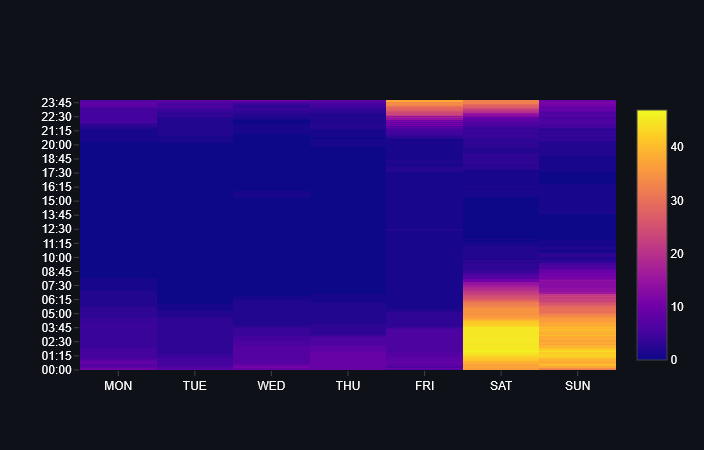
at this point i can start doing whatever data processing i need. here's a crude way of figuring out my active times
 1
 2
 3
 4
 5
 6
 7
 8
 9
10
11
12
13
14
15
16
17
18
19
20
21
22
23
24
25
26
27
28
29
30
31
32
33
34
35
36
37
38
39
40
41
42
43 | df["date"] = df["created_at"].dt.date
df["hour"] = df["created_at"].dt.hour
df["dayofweek"] = df["created_at"].dt.dayofweek # 0=MON
df["left_at"] = df["created_at"] + pd.to_timedelta(df["time"], unit="ms")
# create a list of every minute that i am active
df["minute_range"] = df.apply(
lambda x: pd.date_range(start=x["created_at"], end=x["left_at"], freq="min"), axis=1
)
df["time_active_list"] = df.apply(
lambda y: [
x
for x in y["minute_range"]
],
axis=1,
)
df_perminute = df.explode("time_active_list").reset_index(drop=True)
df_perminute["dayofweek"] = df_perminute["time_active_list"].dt.dayofweek
df_perminute["time_active_list"] = df_perminute["time_active_list"].apply(
lambda y: f"{y.hour:02.0f}:{y.minute:02.0f}"
)
# filter to this year
time_list_dist = (
df_perminute[df_perminute["created_at"].dt.year == 2025][
["dayofweek", "time_active_list"]
]
.value_counts(sort=False)
.reset_index()
)
# binning of data
z = []
for x in range(7):
for y in [f"{h:02.0f}:{m:02.0f}" for h in range(24) for m in range(60)]:
z.append({"dayofweek": x, "time_active_list": y})
time_list_dist = pd.DataFrame(z).merge(time_list_dist, how="left").fillna(0)
time_list_dist.loc[time_list_dist["dayofweek"] == 0, "day_name"] = "MON"
time_list_dist.loc[time_list_dist["dayofweek"] == 1, "day_name"] = "TUE"
time_list_dist.loc[time_list_dist["dayofweek"] == 2, "day_name"] = "WED"
time_list_dist.loc[time_list_dist["dayofweek"] == 3, "day_name"] = "THU"
time_list_dist.loc[time_list_dist["dayofweek"] == 4, "day_name"] = "FRI"
time_list_dist.loc[time_list_dist["dayofweek"] == 5, "day_name"] = "SAT"
time_list_dist.loc[time_list_dist["dayofweek"] == 6, "day_name"] = "SUN"
|
to present my data, i used streamlit
| pip install streamlit
streamlit run .\vrc-wrapped.py
|
and the relevant code
| st.title("VRC Year in Review - antares¬")
st.subheader("Your Most Active Times")
fig = go.Figure(
data=go.Heatmap(
z=time_list_dist["count"],
x=time_list_dist["day_name"],
y=time_list_dist["time_active_list"],
)
)
st.plotly_chart(fig, theme=None)
|
which hopefully produces